
Table of Contents
Google Adsense Basic Requirement
Google Adsense Account Sign up karne ke liye applicant ke pas 2 virtual property and ek Postal Address hona chahiye

Email (Gmail) Account
Aaj ke Digital Environment me shayad hi koi aisa hoga jiske pas Gmail Account nahi ho. Aapke paas bhi Gmail Account jaroor hoga. Yadi Gmail Account Nahi hai to Create kr le.
Blog / Website OR Youtube
Adsense ka kya kaam hai yah aap achchhe se jante ho Newbie ke liye main fir se bata deta hu yah Publisher ke Blog / Website ya Youtube par Ads serve karta hai. To aap khud soch sakte ho jab tak aaapke paas Blog / Website ya Youtube channel nahi ho to iske liye apply bhi nahi kar sakte ho. Ummid hai ki aapne Blog jaroor bana rakha hoga. Sath hi Blog par standard Page (300 per day) views jaroor hoga.
Online Income ke liye Free me Blog Kaise banaye ?
Blog पर Traffic कैसे बढ़ाये How To Drive Traffic on Your Blog ?
Phone Number and Postal Address
Jab aapke Adsense Account me minimum $10 ho jayega to Google aapke Postal Address par ek Postcard Bhejega jisme Account ko verify karne ke liye Code hoga. Code Enter karne ke baad finally aapka adsense account approve ho jayega. Without address verification aap payment receive nahi kar sakte ho.
Google Adsense Account Kaise Banaye
Dekha jaye to Adsense Account create karna bahut hi aasan hai. Yadi applicant ke paas sahi aur satik jankari nahi ho to tough hai. Adsense ke sath Cheating nahin kare ! sabhi information sahi aur sahi se fill kare. Niche diye gaye steps ko sahi se follow kare agle kuchh minute me aapka Adsense Account ready ho jayega.
#1 Sign up and Login
Go to www.adsense.com and click on Sign up Button

Jab aap signup button hit karte hi aapko apne Gmail id se Google me Login karna parta hai. Login ke baad aapke samne Next Screen par aapse puchha jayega same Gmail ID se Adsense Account create karna chahte ho ya naya account create karna chahte ho.

Note : Yadi aapke paas Domain Specific Gmail Address hai to aap usi gmail ka use kare.
Naya Adsense approval process bahut tough aur lamba hai. Adsense ke credibility ko banaye rakhne ke liye yah jaroori hai. Adsense ke Sign Up Page me diya gaye Terms & Conditions ko dhyan se padhe.
Upar ke Screen Short me aap dekh rahe honge yaha teen Part hai Your Account, Your Website and Your Information.
- Account Information : Sign In ya Create button hit kare jo aapke liye suitable ho.
- Website Information : Next Screen me Website Information. Website ka Language sahi se Choose kare.
- Your Information : Self Information Jaise Sarkari Naukri ke liye ya 10th / 12th ka form fill karte samay sahi Information fill karte ho thik waise hi bilkul sahi Information fill kare. Dhyan rahe Jis Name se Bank Account ho wahi name bhare.
BLOG बनाने के लिए BEST 50 Topic
अपने Domain को Hackers से Safe कैसे रखे?
#2 Your Website

Mai already upar bata chuka hu, yaha Blog ka URL aur Language Select kar Save and Continue Button hit kare.
Note: Website address Without http:// and https:// ke enter kare.
#3 Your Information
Yaad rahe Contact Information sahi bharna hai. Isi address par PIN aayega, Pin verification baad hi Payment release hogi.

Form Kaise Fill kare
- Select Country
- Select Time Zone of Country India ka Time Zone UTC + 05:30 hai.
- Sinngle Owned Kar rahe hai to individual select kare. Kisi Company ya Organization ke liye Create kar rahe hai to Business select kare.
- Jis Name se Bank Account hai wahi Name Enter kare. Business Account ke Case me Company ka Name likhe yaad rahe Company Name se Account hona chahiye.
- Sahi Address fill kare kyunki isi address par Verification PIN aayega. Address me PIN Code (ZIP) jarur mention kare.
- Select Your State Name
- Primary Name me bhi apna Certificate Name enter kare.
- Permanent Mobile Number Enter kare. Mobile Number Verification ke liye Adsense ki taraf se SMS ya Call ayega.
- Enter your Email ID
- Adsense ke bare me aapne kaise jaana wo Select kare.
- Email Preference me sabhi ko yes kar de. aisa karne se Adsense related information aapke email par aata rahega.
- Submit my application Button hit karne se pahle sabhi jankari ko sahi se Check kar le.
Blogging में सफलता प्राप्त करने का मतलब क्या है ?
Future of Indian Bloggers and Problems with Indian Bloggers
Yah most important part hai. Is Guide ki madad se applicant aasani se form fill up kar sakta hai. Form me diya gaya “Payee Name” dhyan se bhare. Jis Name se applicant ka Bank Account hai wahi Name bahre. Google Adsense isi Name ke Bank account me Payment Transfer karega. Ise Change Karne ka Option bahut tough hai. According to Google Policy Kuchh Country me yah Payee Name ko change karne ka Option Nahi deta hai.
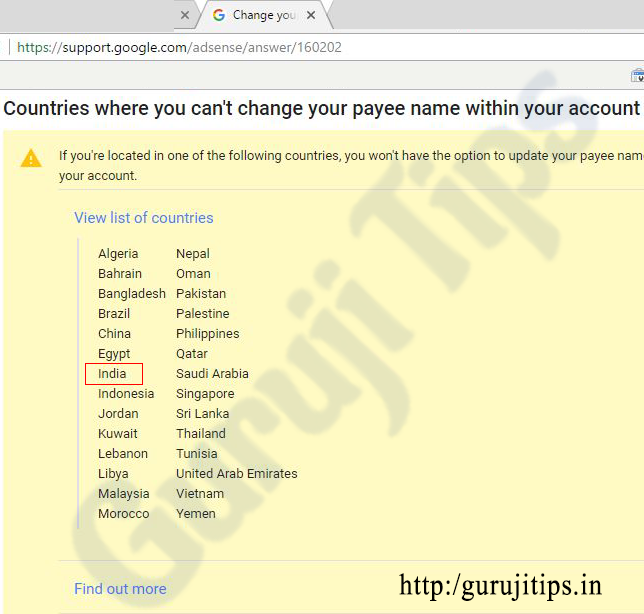
Lekin yadi aap Payee Name Change karna chahte ho to aapko yah account band kar naya account banana hoga. Find Out More Button ka Screen Short Niche Share Kar raha hu.

Is Link par Click kar aap Check kar sakte hai : https://support.google.com/adsense/answer/160202
#4 Mobile Number Verification
Mobile Number Verification ke liye Permanent Mobile Number Enter kare.
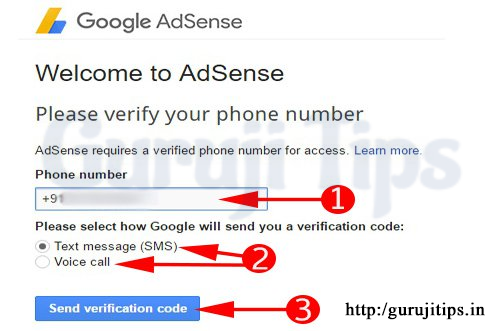
- Mobile Number Enter kare
- Text Message (SMS) ya Voice Call ka Option Select kare
- Send Verification Code Button Hit kare

Text SMS hi Select kare Apna Mobile ka inbox check kare Text Message me aaye aaye SMS ko First Box me fill kar Verify Button Hit Kare yadi kuchh der me message nahi aata hai to Resend Code par Click kare.
#5 Read and Accept Terms & Conditions
Google Adsense Account kaise banaye iske liye Terms and Conditions ko Accept karne se pahle ise achchhi tarah se padh le.
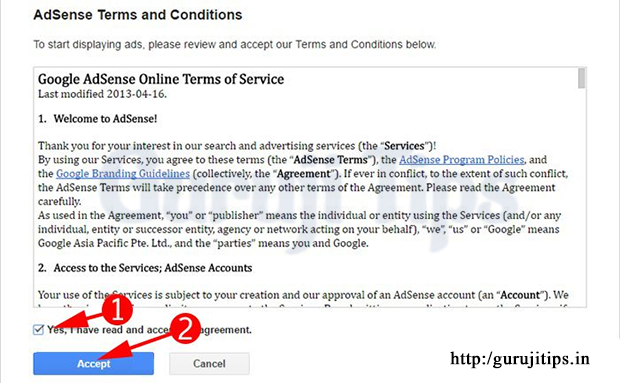
Google Adsense Online Terms of Service Read karne ke baad Yes, I have read and accept agreement me √ Tick kar Accept Button Hit kare.
Accept Button Hit karte hi Google Adsense ki taraf se Thank you for applying adsense ka message display hoga. Sath hi linked Gmail id par bhi ek Thank you mail receive hoga.
Congratulation ! App ne Adsense Account ke liye Apply kar diya.
Agle Process me Google Adsense team aap ke Blog / Website ko manual check karti hai. Yadi aapka Blog / Website Adsense Policy ko follow karta hai to Check karne ke baad aap ka asdense account approved kar diya jayega. After approval aap ke Gmail ID pe Congratulations! Your account is now fully approved ka mail aa jayega.
Yadi aapka account approve nahi hota hai to Adsense Team With Cause aapko mail kar denge. Aisa hone ghabrana nahi hai Jis wajah se approval nahi mila use fix kare then fir se apply kare.

Case Study : Blogspot Vs WordPress सफलता और असफलता
[Case Study ] हिंदी या Hinglish : Blogging के लिए बेहतर क्या है ?
Google Adsense Account Apply karne ke baad EK sawal jo aapke man me jaroor machcal raha hoga.

Nice Post Sir and Very helpful Post Google Adsense Account Kaise Banaye Full Tutorial
Mere pass WordPress site bhi hai or google adsense account bhi par me do no ko set nhi Kat pa raha hu
Kya problem aa rahi hai.
nice article it’s helpful. thanks
nice information
Sir mai new hu is field m….But blog start krna chahti hu….kya blog banane k 6 months k bad absence apply hoga aur kis gmil i’d se login) krenge jisse blog m use kiya h wo ya other….???
N kya main ek se jada blog bna skti hu?
Adsense ke liye kabhi bhi apply kar sakti ho. ek gmail se ek adsense apply kar sakte ho. aap jitna chaho utna blog bana sakte ho.
Beginners के लिए बहुत अच्छा गाइड है. वैसे भी हिंदी ब्लोग्गेर्स के लिए Google Adsense के अलावे कोई अच्छा आप्शन नहीं है.
thanks for sharing this information. have shared this link with others keep posting such information.
hey
your article is really very informative thanks for sharing
keep it work
Thank you Mr. Rajat Kushwaha
Sir yadi WordPress. Com pe free id banaya ho to Kya use Google adsense se job sakte hai.. Matlab Kya usko as a website use Kar sakte hai.. Ye bata dijiye
WordPress.Com पर Adsense का Code नहीं लगा सकते हैं.
Impressiv information sir
naya blogger keliye acchi jankari
Thank You Utpal Kanwar
Ye bataye agar adsense ka pin ni aata to usko verifie krne ka dusra tarika ni h??
Adhar Card se verify kar sakte hai.
Sir,
main aapse ek jaankari chahta hu.jaisa ki maine ek blog banaya
jiske throw mene adseanse account creat kar liya jisme mene 5-6 posto
publish ki par maine uss blog par post karna band kar diya.isske baad
maine dusar blog banaya jiska domin purches kiya.jo knowledgehindi
ke naam se hai.aap muje yeh bataye ki iss blog ke liye adseanse account ko
creat karna hoga ya pahle wale blog ke dowara banaya gaya adseanse a/c
ka use kare to kaise kare.agar knowledgehindi.com ke dusra banaye to
adseanse ke neeyam ke virodh to nhi hoga .plse help me sir.
Purane adsense ka code is site par use kar sakte hain.
web sit naahi hai to kya kare
Website नहीं है तो बनाये. https://gurujitips.in/how-to-create-a-blog-for-free-hindi/
Thank YOu Ashutosh bhai,, GOod infromation
Welcome Virat and Thank You for your Complement.